- Published on
Hunting bugs with a team of agents
- Authors

- Name
- Avasdream
- @avasdream_
I wanted a second pair of eyes on a codebase I had been moving fast on, so I handed it to a team of agents and asked them to look for bugs. One agent per area, each one writing up what it found, plus a dashboard tying it all together.
It worked better than a single "review my code" prompt usually does, mostly because each agent kept its attention on one subsystem instead of skimming the whole repo. Here is the prompt, the version I would use next time, and a look at what the run produced.
The prompt I started with
I typed this straight into Claude Code:
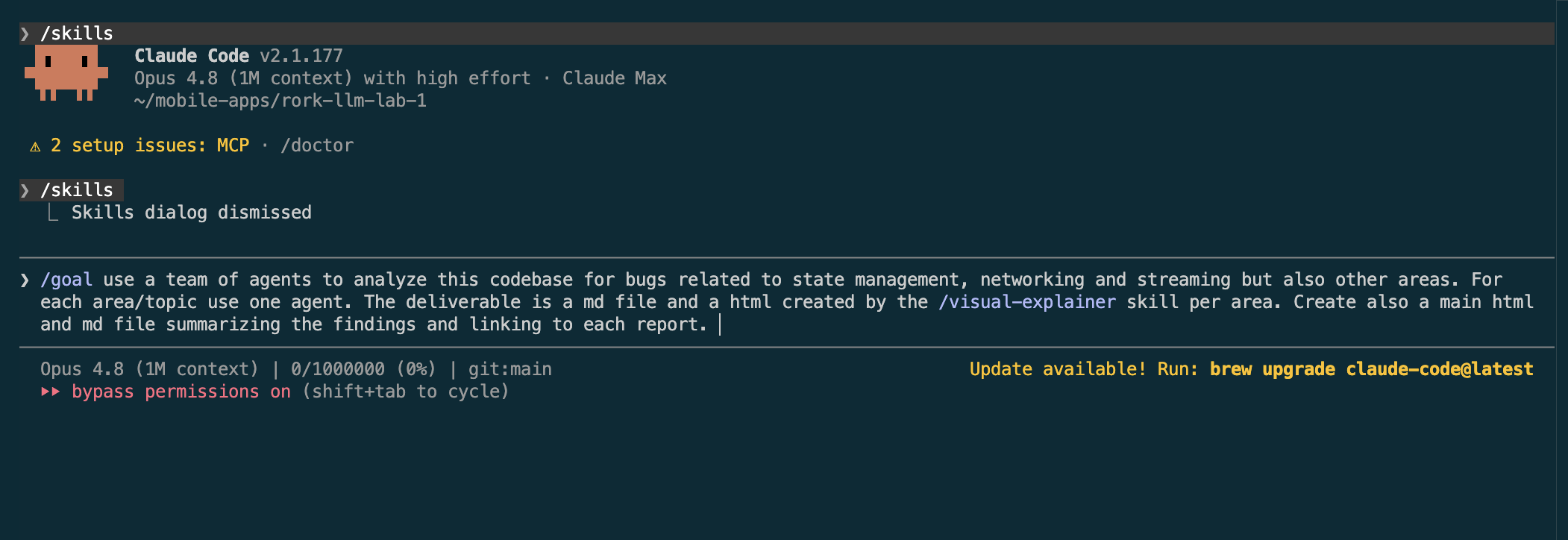
use a team of agents to analyze this codebase for bugs related to state
management, networking and streaming but also other areas. For each
area/topic use one agent. The deliverable is a md file and a html created
by the /visual-explainer skill per area. Create also a main html and md
file summarizing the findings and linking to each report.
That gets you most of the way. The agents fan out, each one takes a topic, and you end up with a report per area and a summary page. But the first run had a problem I have seen before: some of the findings were guesses. An agent would flag something that read like a bug without checking whether the code actually behaved that way.
The version I use now
The fix is to bake verification into the job itself. Here is the prompt I reach for now:
Use a team of subagents to audit this codebase for bugs. Cover state
management, networking, and streaming, plus any other risky areas you
find (persistence, concurrency, security). Spawn one agent per area so
they run in parallel.

Each agent must:
- read the real source for its area, not assume behavior
- for every suspected bug, check it against the code and drop anything
  it cannot confirm
- report only confirmed findings, each with a severity, the file and
  line range, what is wrong, why it matters, and a concrete trigger

Per area, produce one Markdown report and one HTML report built with the
/visual-explainer skill. Then write a main Markdown and HTML dashboard
that summarizes every area and links to each report.
Three changes are doing the work here. I name a few extra areas so nothing obvious gets skipped, I force each finding to carry a file, a line range, and a way to reproduce it, and I tell the agents to throw away anything they cannot back up against the source. That last rule is the one that matters. A confirmed-only report is shorter and far more useful than a long list of maybes.
What the run does
Each area agent follows the same path. It reads the source for its slice of the codebase, tries to break every suspected bug against the actual code, and keeps only what survives. Anything it cannot confirm gets dropped instead of padding the report.
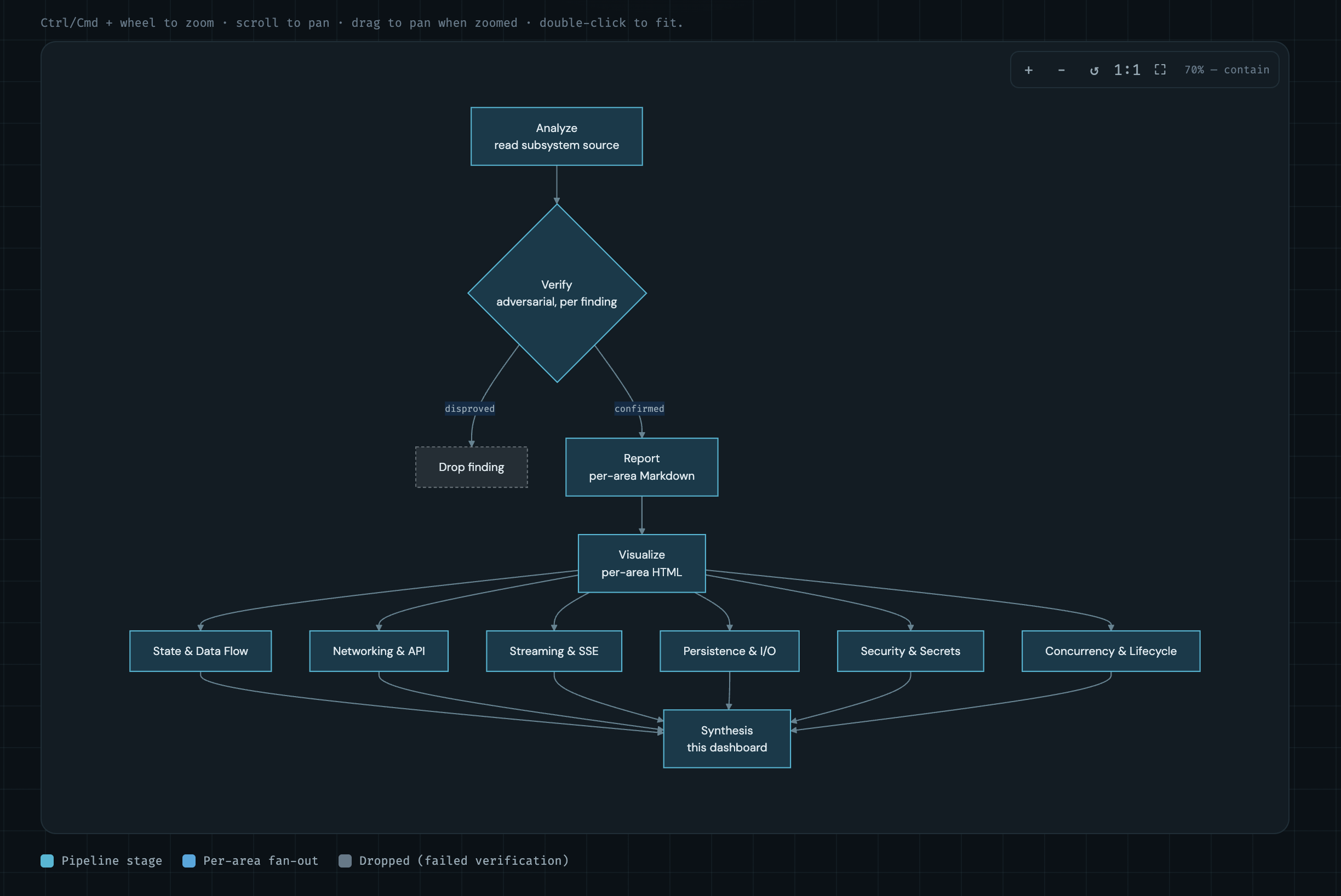
The verify step is the gate. A finding that fails it never reaches the report, which is why the counts on the dashboard only ever show confirmed bugs.
What came back
The summary page lays out one card per subsystem with a severity breakdown and the headline findings:
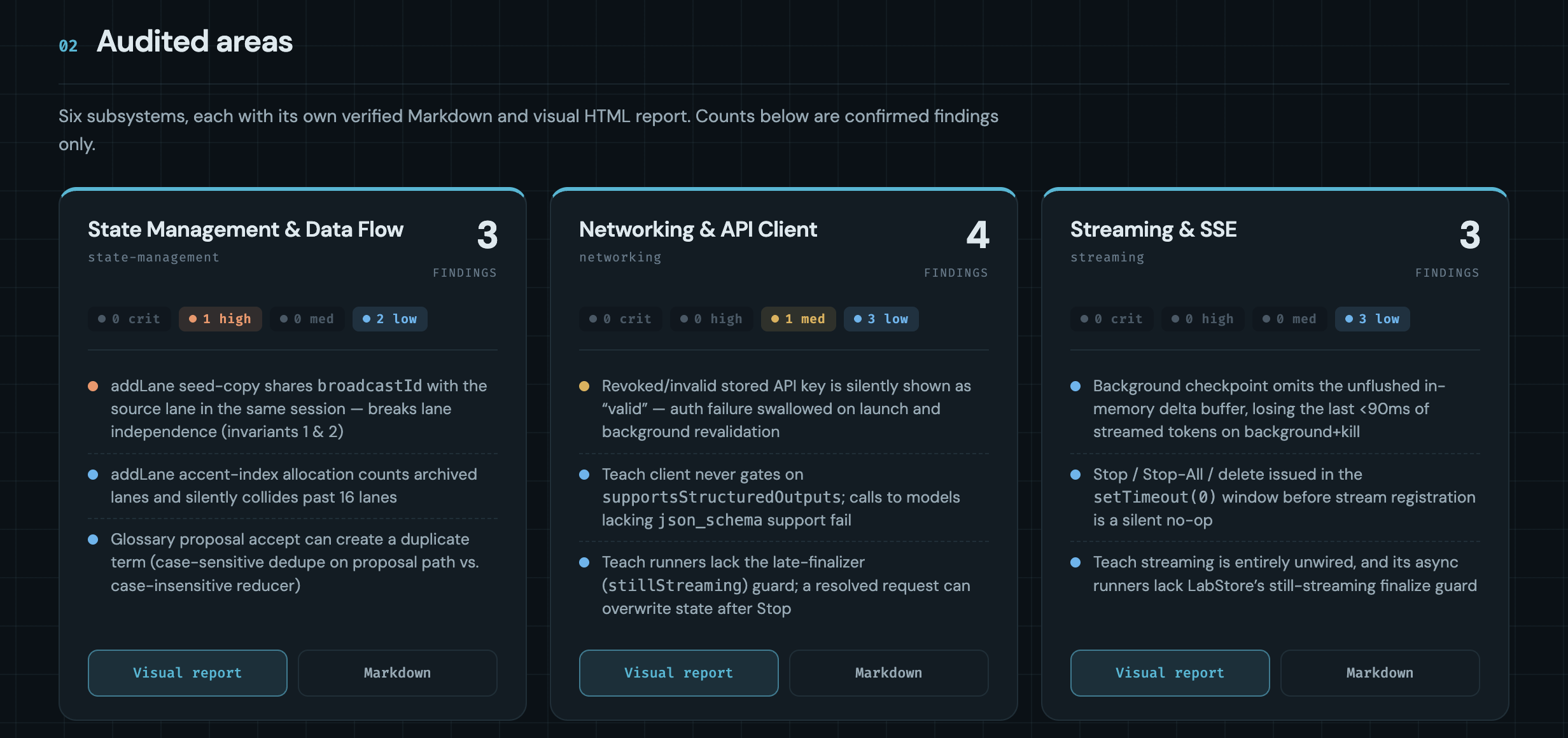
Six subsystems, sixteen confirmed findings, two of them high severity. The top-priority table pulls the serious ones to the front so I know where to start:
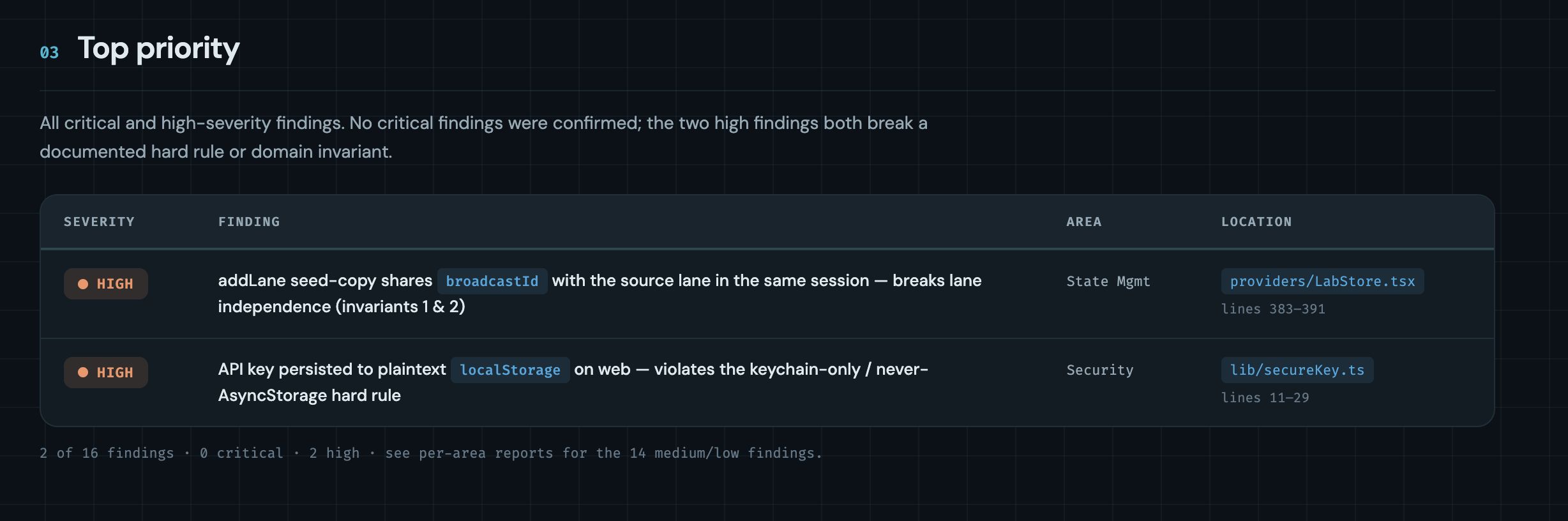
Each finding links through to a full write-up. This is the one I cared about most, a state-management bug where adding a lane seeded from another lane's history copies a shared broadcastId, which then leaks edits and deletes across two conversations that were supposed to be independent:
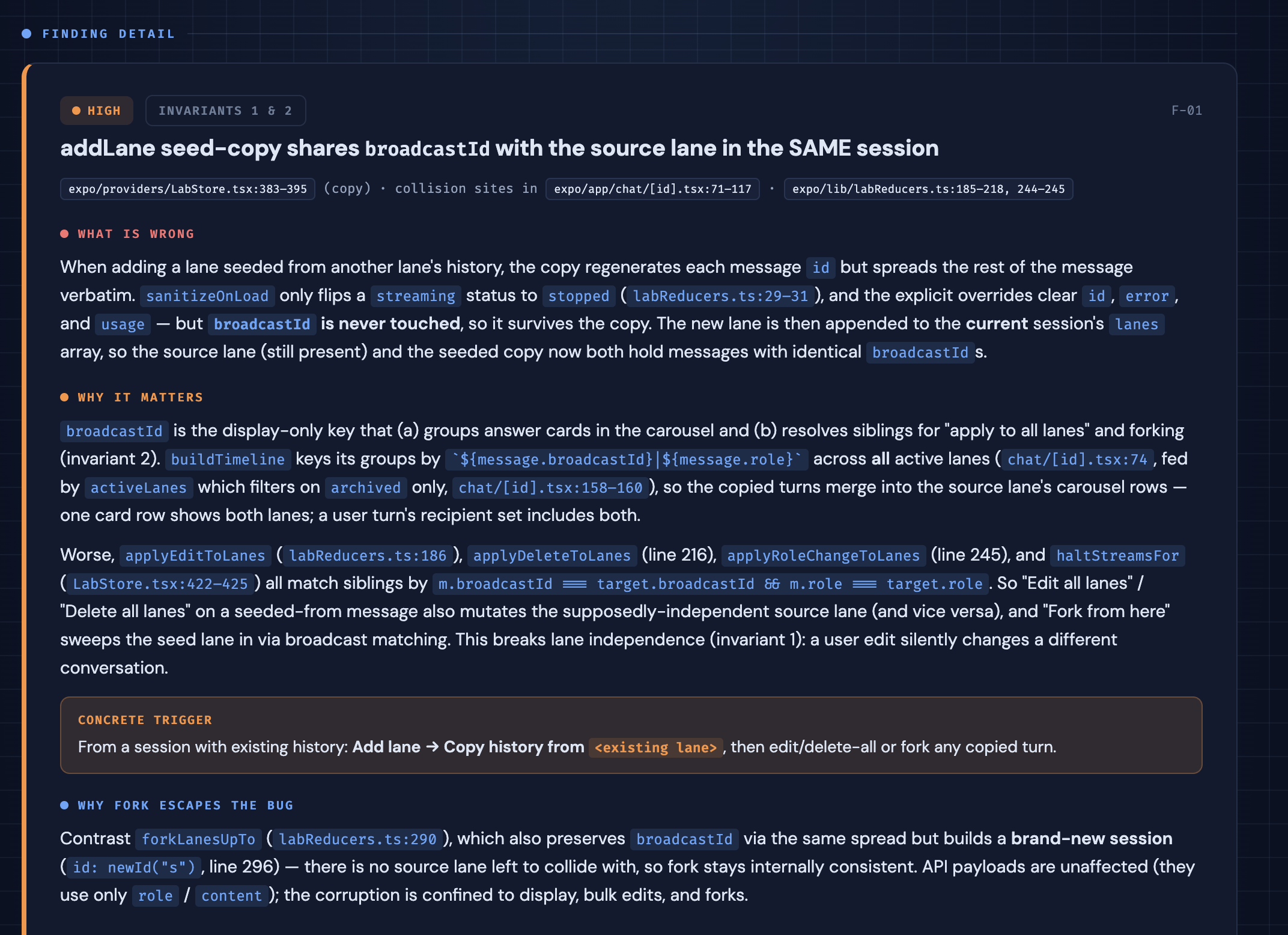
The write-up points at the exact lines, explains why the shared id matters, and gives a trigger I can follow by hand: add a lane, copy history from an existing lane, then edit or delete a copied turn. That last part is what makes a finding worth acting on. I can reproduce it in under a minute and decide for myself whether the agent got it right.
What I would tell you before you try it
One agent per area is the part that pays off. Each agent holds a small slice of the codebase in context and reasons about it properly, instead of one agent paging through everything and losing the thread.
The verification rule earns its place too. Without it you get a tidy report full of plausible bugs that waste an afternoon. With it, the findings that reach you are ones the agent already tried and failed to disprove.
It is still not a replacement for reading the code. The agents missed things, and a couple of low-severity findings turned out to be intended behavior once I looked. Treat the output as a ranked list of places to look rather than a final verdict, and the concrete triggers make each one quick to check.
If you want the same kind of HTML reports, the /visual-explainer skill is what builds them from each agent's Markdown.